AI-native workspace for remote servers
Connect once, then keep terminals, SFTP, remote desktops, port forwarding, transfers, lightweight editing, local shells, and OxideSens AI in one local-first desktop app.
Native GPUI. No bundled WebView. No telemetry. No subscription. BYOK-first. Pure-Rust SSH without OpenSSL/libssh2.
Open Source · GPL-3.0 · BYOK-firstTHE DIFFERENCE
Why OxideTerm?
Not just a terminal. An AI-native workspace for remote servers that stays local‑first.
| The Problem | OxideTerm's Answer |
|---|---|
| Remote server work is split across too many tools | AI-native remote-server workspace — terminals, SFTP, RDP/VNC, port forwarding, trzsz, lightweight IDE, monitoring, and OxideSens AI under one node |
| You still need a local shell | Integrated local shell — zsh/bash/fish/pwsh/WSL2 beside SSH sessions, so local and remote tasks share one UI |
| Remote file editing needs another dedicated development tool | Built-in IDE — native GPUI editor over SFTP with tree-sitter highlighting for 36 languages and an optional remote agent |
| No SSH connection reuse | Multiplexing — one SSH connection shared across terminal, SFTP, forwarding, and IDE |
| SSH libraries depend on OpenSSL | russh 0.63.0 — SSH uses russh with the aws-lc-rs cryptographic backend. No libssh2 or system OpenSSL runtime is required. |
| 100+ MB Electron apps | Native GPUI — a Rust desktop app without an Electron or WebView runtime layer |
| You do not want telemetry or app subscriptions | Zero tracking, zero core app subscription — SSH/SFTP/port forwarding/local shell need no OxideTerm account or subscription; Cloud Sync remains opt-in |
| Credentials stored in plain-text configs | Encrypted at rest — OS keychain for passwords, ChaCha20-Poly1305 + Argon2id for .oxide exports. Nothing in plain text |
| You want AI without a platform account | BYOK-first OxideSens AI — inspect saved connections, live SSH sessions, terminal buffers, SFTP paths, settings, and knowledge base entries, then perform approved workspace actions |
LIVE DEMO
Watch It in Action
OxideSens AI can inspect live terminals and use approved workspace tools from one assistant.
DEEP DIVE
Everything You Need, Nothing You Don't
Terminal
- Split panes and broadcast terminal input
- GPU-backed GPUI rendering with adaptive quality and compatibility profiles
- Session recording & playback (asciicast v2)
- 33 themes with a native color-token theme editor
- Command palette (⌘K) and zen mode
- Configurable keyboard shortcuts for app, terminal, and pane actions
- Auto-complete for SSH hostnames and saved sessions
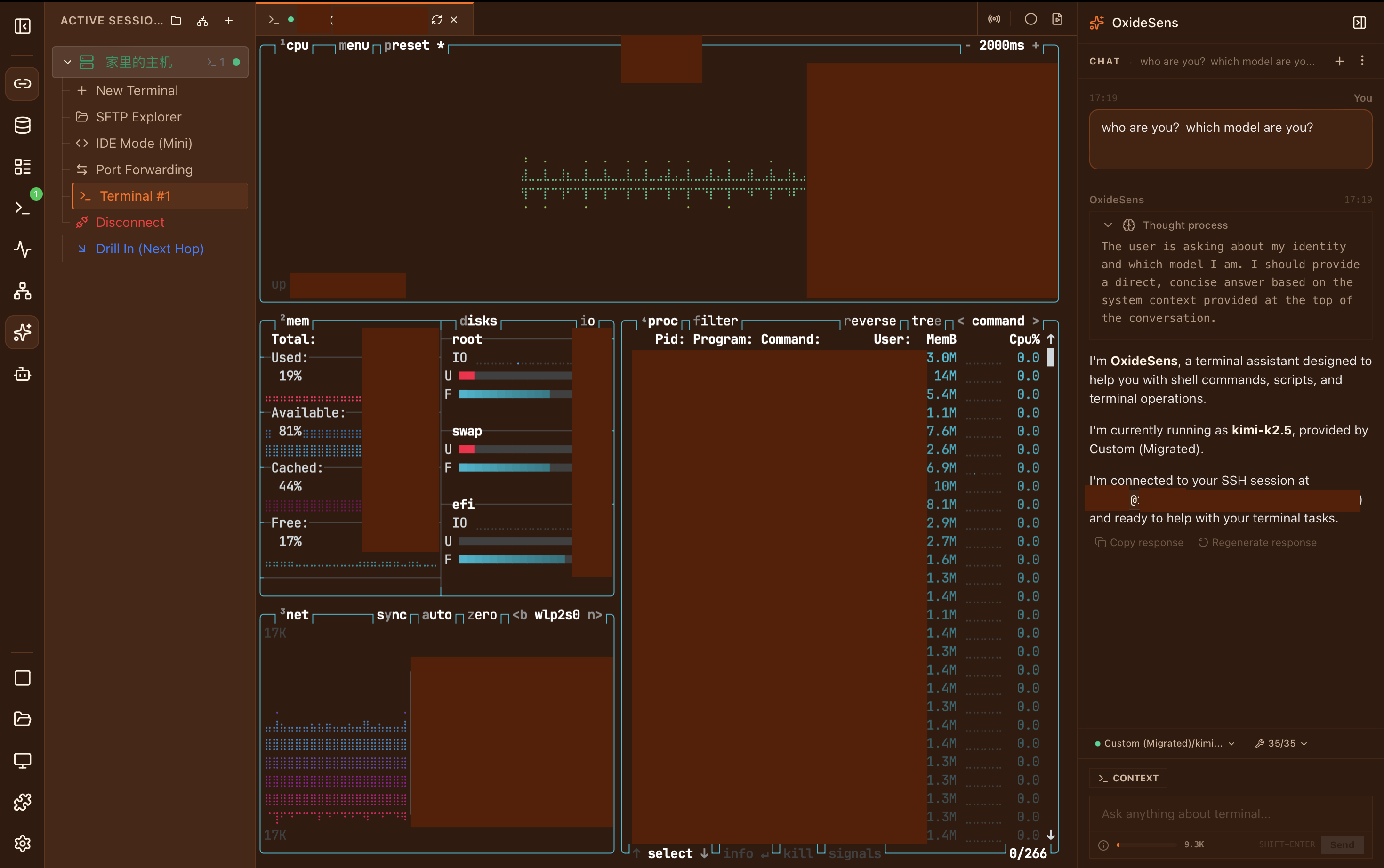
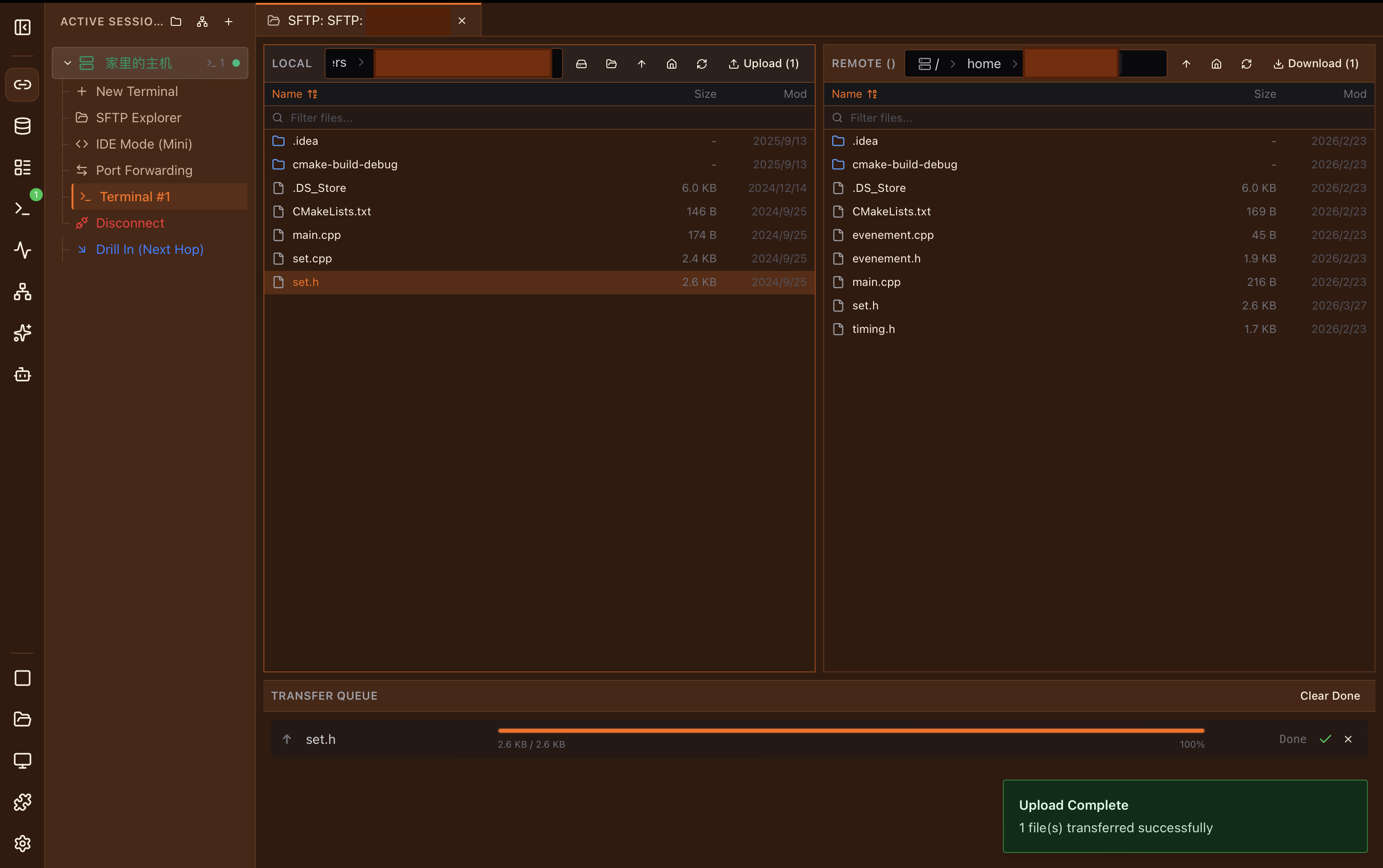
SFTP File Manager
- Dual-pane local and remote file browser
- Smart preview: images, video, audio, code, hex, fonts
- Transfer queue with real-time progress & ETA
- Bookmarks and archive extraction
- Rename, delete, create folders, and batch transfers
- Watch mode with auto-upload on local changes
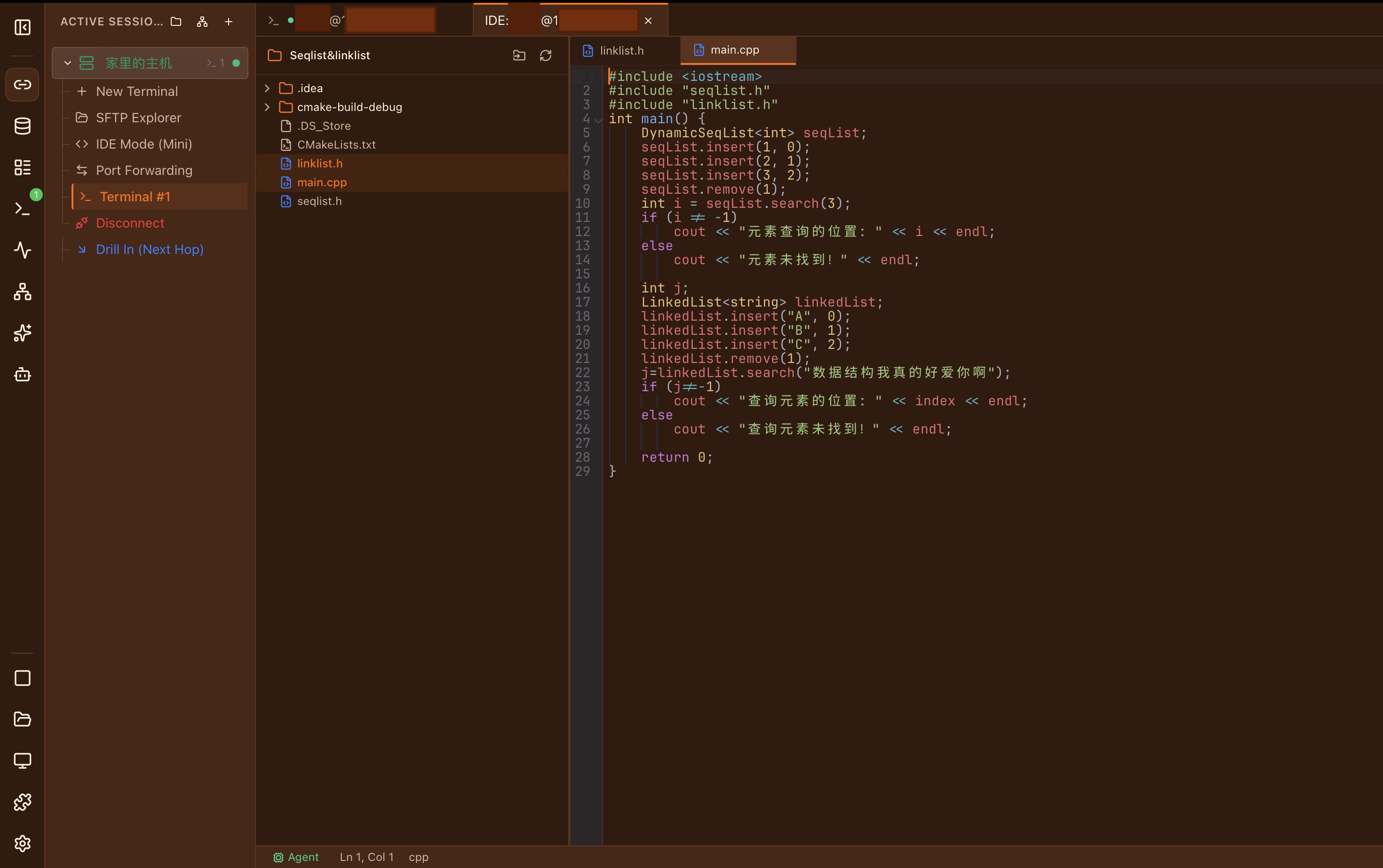
Built-in IDE
- Native GPUI editor with tree-sitter support for 36 languages
- File tree with Git status indicators
- Multi-tab editing with conflict resolution
- Optional bundled remote agent for Linux x86_64 and aarch64
- Search & replace with regex across remote files
- Tree-sitter highlighting for 36 languages, including Rust, Python, JS/TS, Go, C/C++, Java, YAML, JSON, TOML, Markdown, and Shell
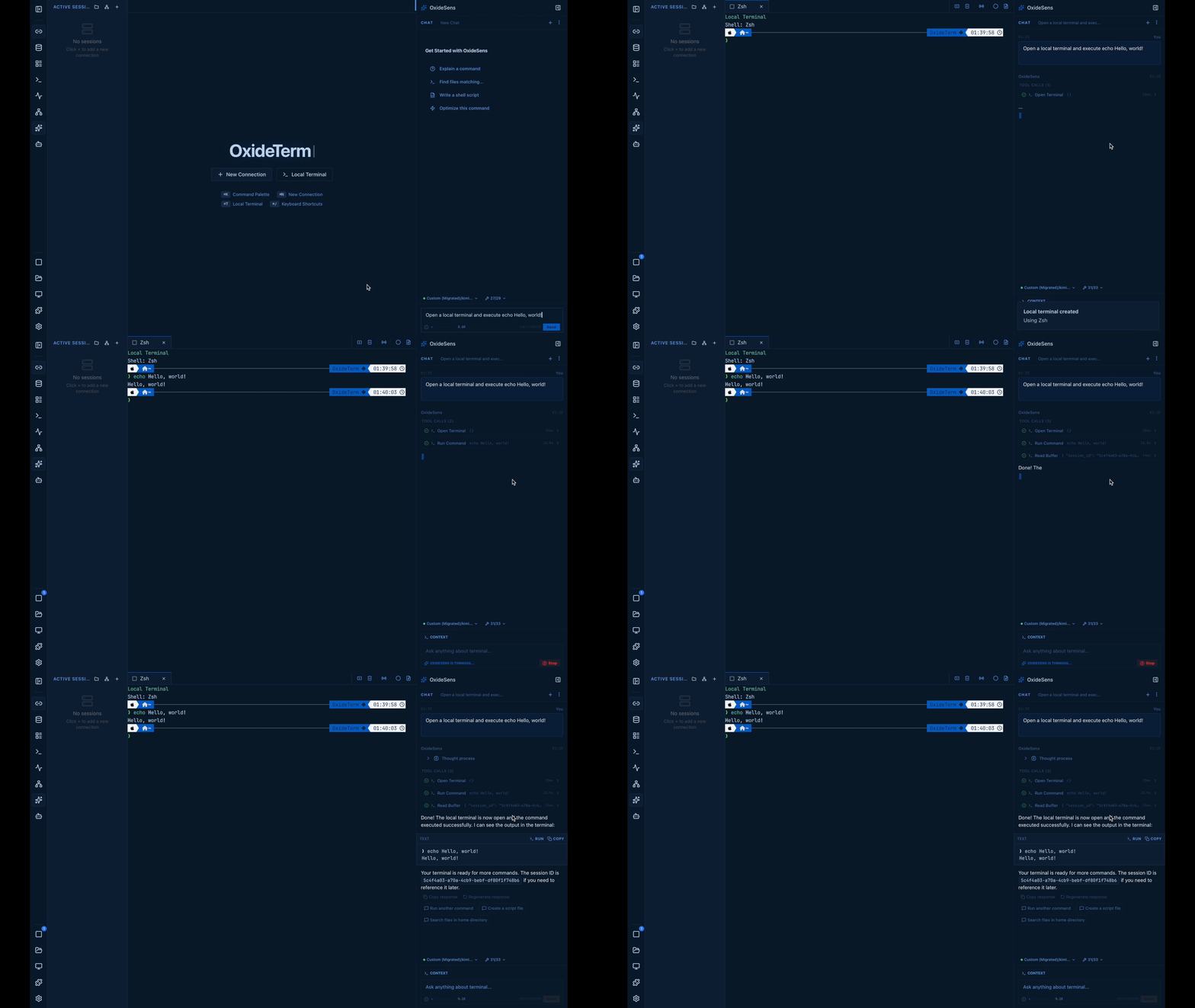
OxideSens AI
- Inline panel (⌘I) + chat
- Target-first workspace tools
- RAG knowledge base with keyword + vector retrieval
- Diagnose remote output, run approved commands, inspect files, and explain failures
- Bring your own key — OpenAI, Anthropic, Google, DeepSeek, Ollama, or compatible endpoints
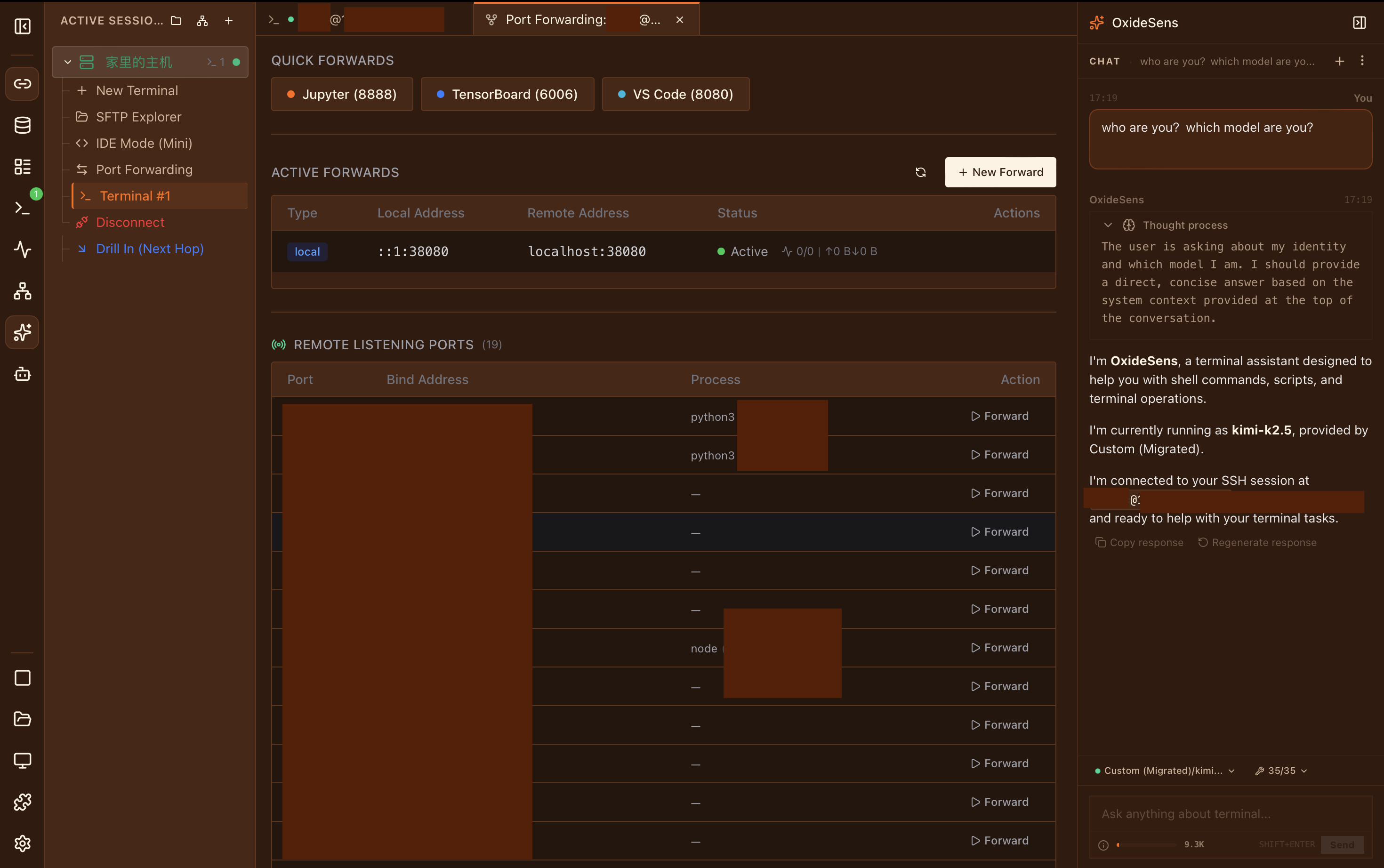
Port Forwarding
- Local (-L), Remote (-R), Dynamic SOCKS5 (-D)
- Lock-free message-passing I/O
- Auto-restore all forwards on reconnect
- Death reporting and idle timeout
- Real-time bandwidth and latency monitoring
ZERO TRUST
Security First
Enterprise-grade protection without enterprise complexity.
High-Strength Encryption
ChaCha20-Poly1305 AEAD with Argon2id KDF (256 MB memory, 4 iterations) for .oxide encrypted exports.
OS Keychain Integration
Passwords and API keys stored in macOS Keychain, Windows Credential Manager, or Linux Secret Service. Never in config files.
SSH Cryptography
SSH uses russh 0.63.0 with the aws-lc-rs cryptographic backend. No libssh2 or system OpenSSL runtime is required.
Biometric & TOFU
Touch ID gates keychain access on macOS. Host key verification with Trust-On-First-Use (TOFU). Sensitive memory zeroized on drop.
Memory Zeroization
Owned sensitive buffers are cleared with zeroize when dropped. Secret lifetimes and unnecessary copies are limited.
In-Process Native Runtime
Terminal I/O and workspace control stay inside the native Rust process, removing the old browser bridge and its session-token boundary.
ARCHITECTURE
Under the Hood
Native Runtime Architecture
SSH sessions, workspace state, and terminal surfaces run inside one native Rust application instead of crossing a WebSocket and IPC boundary.
GPUI GPU Rendering
The terminal is rendered by GPUI's GPU-backed native renderer, with adaptive rendering controls and a compatibility profile for lighter visual effects.
Connection Multiplexing
One SSH connection shared across terminal, SFTP, forwarding, and IDE. Reference-counted pool with automatic cleanup.
High-Strength Encryption
ChaCha20-Poly1305 AEAD with Argon2id KDF (256 MB memory, 4 iterations). OS keychain for passwords, Touch ID gate on macOS.
11 Languages
English · 简体中文 · 繁體中文 · 日本語 · 한국어 · Français · Deutsch · Español · Italiano · Português · Tiếng Việt
Plugin Ecosystem
Wasm and process plugins can contribute native tabs, sidebar panels, settings, commands, status items, shortcuts, and terminal hooks.
FROM THE CREATOR
I built OxideTerm because I wanted one tool that actually does everything — SSH, SFTP, port forwarding, code editing — without feeling heavy or asking for a subscription. The tech choices (pure-Rust SSH, binary wire protocol, ChaCha20 encryption) aren't there to show off; they're just what made sense when you want something fast, portable, and correct. It's a solo project, so it won't be perfect, but I'd rather ship something honest than something polished with corners cut.
COMPARE
How Does OxideTerm Compare?
A factual look at what different approaches to terminal tooling offer.
| Capability | OxideTerm | Cross-platform Terminal | Professional SSH Client | Integrated Remote Toolbox | Remote Development IDE |
|---|---|---|---|---|---|
| Cross-Platform Availability | macOS · Windows · Linux | Varies | Varies | Varies | Varies |
| Package Size | 60–95 MB | Varies | Varies | Varies | Varies |
| Desktop UI Runtime | Native GPUI | Browser Runtime | Native Desktop | Native Desktop | Browser Runtime |
| SSH Implementation | russh 0.63.0 + aws-lc-rs | Built-in SSH Stack | Built-in SSH Stack | Built-in SSH Stack | System OpenSSH |
| Local Terminal | ✓ | ✓ | ✓ | ✓ | ✓ |
| Built-in SFTP | ✓ | ✓ | Partial | ✓ | — |
| Built-in Port Forwarding | ✓ | ✓ | ✓ | ✓ | ✓ |
| Remote Code Editing | ✓ | — | — | Partial | ✓ |
| Remote Desktop (RDP & VNC) | ✓ | — | — | ✓ | — |
| AI with Terminal Context | ✓ | — | — | — | ✓ |
| Graceful Reconnect (Session Preservation) | ✓ | — | — | — | Partial |
| Connection Multiplexing | ✓ | Varies | Varies | Varies | Partial |
| Plugin System | ✓ | ✓ | — | ✓ | ✓ |
| Multi-language UI | ✓ | ✓ | ✓ | ✓ | ✓ |
| Open Source | ✓ | ✓ | — | — | Partial |
| Free to Use | ✓ | ✓ | Partial | Partial | ✓ |
The four anonymous columns summarize representative products. Capabilities reflect currently documented behavior and may change by version or edition.
COMMAND LINE
CLI Companion
Meet oxideterm — headless management for your workspace.
Inspect and manage settings, saved connections, forwards, plugins, portable bundles, cloud sync, backups, and diagnostics. Write operations support dry runs and machine-readable output.
FAQ
Frequently Asked Questions
Is OxideTerm free?
Which SSH authentication methods are supported?
Where is my data stored?
Can I use OxideTerm offline?
What do I need for AI features?
Why doesn't OxideTerm's SSH stack use libssh2 or OpenSSL?
COMPLIANCE
Compliance & Legal
OxideTerm is designed for legitimate system administration, development, and research. We take compliance seriously.
Network Compliance
OxideTerm is a professional remote server management and terminal emulation tool. This software is intended solely for compliant system administration, network management, software development, and academic research. Users must strictly comply with all applicable laws and regulations when using SSH tunneling or port forwarding features. Any use of this software for unauthorized access to restricted resources or violation of cybersecurity regulations is strictly prohibited.
AI Service Disclaimer
OxideTerm stores AI conversation history on your device. When you make an AI request, the messages and any context you choose to include are sent directly to the provider you configured and are handled under that provider's terms and privacy policy. Local model providers can keep this traffic on your machine. OxideTerm does not operate an AI relay or collect these conversations. Use AI features only with data you are authorized to share and in accordance with applicable laws and provider terms.
Local-first. Cloud on your terms.
Core work stays local and needs no OxideTerm account. Credentials stay in your system keychain; Cloud Sync and AI connect only when you choose and configure a provider.
License
This software is distributed under the GNU General Public License v3.0 (GPL-3.0). OxideTerm previously used PolyForm Noncommercial and moved to GPL-3.0 to avoid source-available traps, noncommercial ambiguity, and no-competition riders. Public code is not automatically open source: no-redistribution, no-repackaging, no-competing-products, or platform-approval riders turn it into source-available branding. OxideTerm adds none of those riders.
This page is provided for informational purposes only and does not constitute legal advice. Users are responsible for ensuring their use of OxideTerm complies with all applicable local and international laws.
GET STARTED
Download OxideTerm
Available for macOS, Windows, and Linux
Native GPUI builds are available for macOS, Windows, and Linux. No system WebView runtime is required.